Elegant Classic Signature: A Timeless Script Font for Editorial Design
As a designer and content creator, I’ve spent years exploring fonts that balance elegance with readability. When it comes to editorial design, the right typeface can elevate a publication from good to exceptional. Enter Elegant Classic Signature, a script font that brings both sophistication and warmth to any layout. Designed with a graceful, flowing style, this font is perfect for those who want to add a touch of handwritten charm without sacrificing clarity.
A Font That Speaks Volumes
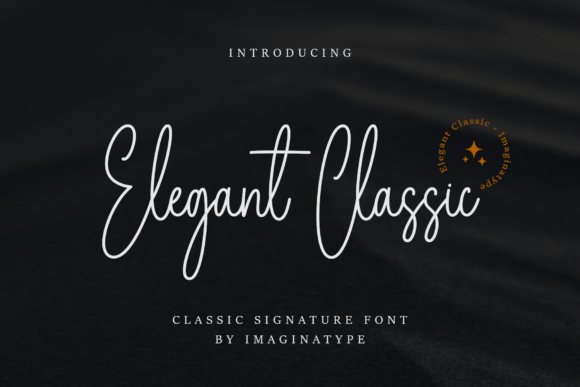
Elegant Classic Signature is more than just a decorative choice—it’s a statement. Its signature strokes are clean yet expressive, making it ideal for headers, cover text, and pull quotes. The font carries a classic aesthetic with a modern twist, which makes it versatile enough for both traditional and contemporary editorial projects.
The visual personality of Elegant Classic Signature is warm and inviting, making it particularly effective in lifestyle blogs, wedding guides, and creative newsletters. Its flowing lines evoke a sense of personalization, which is especially useful when designing content that feels handcrafted or curated. Whether you're creating a print magazine or a digital newsletter, this font adds a layer of character that resonates with readers.
Where to Use Elegant Classic Signature
One of the strengths of Elegant Classic Signature is its adaptability. Here are some practical ways to incorporate it into your editorial work:
- Blog Headers: Use it for blog titles to create an immediate visual impact. Its elegant curves make it stand out while maintaining legibility.
- Magazine Covers: This font is excellent for cover text, adding a refined touch that complements the overall design.
- Ebook Titles: For digital publications, Elegant Classic Signature works beautifully as a title font, offering a blend of artistry and professionalism.
- Newsletter Graphics: Incorporate it into pull quotes, section headings, or social media graphics to enhance visual hierarchy.
- Quote Layouts: Its script style makes it ideal for emphasizing key quotes or testimonials in articles.
- Printable Guides: Whether it's a planner, worksheet, or printable resource, this font adds a polished feel that appeals to a wide audience.
- Content Branding: Use it as part of your brand identity—whether for logos, social media handles, or email signatures.
Supporting Visual Hierarchy and Reader Engagement
Visual hierarchy is crucial in editorial design, and Elegant Classic Signature plays a key role in guiding the reader’s eye through your content. By using this font strategically, you can highlight important sections, such as headlines, subheadings, or call-out boxes, while keeping body text readable with a complementary serif or sans-serif font.
For example, pairing Elegant Classic Signature with a clean sans-serif font like Helvetica or Montserrat can create a balanced contrast. The script font adds visual interest, while the sans-serif ensures readability across different screen sizes and devices.
When used for pull quotes or chapter openers, Elegant Classic Signature draws attention without overwhelming the reader. It’s also effective for accent typography—such as footnotes, captions, or decorative elements—where a subtle but stylish touch is needed.
Readability Across Platforms
While Elegant Classic Signature is visually appealing, it’s important to consider its performance across various mediums. On screens, ensure that the font size is large enough to maintain clarity, especially on mobile devices. In PDF exports, check that the font renders consistently and doesn’t cause any formatting issues.
For print layouts, the font’s flowing style works well with high-quality paper and ink, making it suitable for magazines, brochures, and other physical publications. However, always test the font in different environments to ensure it maintains its intended look and feel.
Font Pairing and Stylistic Flexibility
Pairing Elegant Classic Signature with other fonts can significantly enhance your editorial design. For body copy, consider combining it with a serif font like Georgia or Baskerville for a classic, professional look. Alternatively, pair it with a clean sans-serif font for a more modern, minimalist aesthetic.
If you’re working on a digital magazine or online course, Elegant Classic Signature pairs well with a readable sans-serif font for captions, navigation menus, and sidebars. This creates a cohesive design that balances form and function.
Additionally, check if the font includes alternate styles, ligatures, and weights. These features can help you fine-tune your design for different applications, whether it’s a logo, a website header, or a social media post.
Commercial Licensing and Practical Considerations
As a publisher or content creator, it’s essential to understand the licensing terms for Elegant Classic Signature. Ensure that you have the proper commercial license for use in ebooks, templates, printables, paid newsletters, and client publications. Most premium fonts offer flexible licensing options that cater to both personal and commercial projects.
When using Elegant Classic Signature in digital downloads or online courses, verify that the font supports multilingual characters if needed. This ensures that your content remains accessible to a global audience.
Finally, always keep your design assets organized. Store fonts in a dedicated folder, and label them clearly so you can easily access them for future projects. This helps maintain consistency across all your editorial work.